This article explains the reliable and government-verified process to check whether your Aadhaar is linked (seeded) with your bank account. All steps below follow official guidance from UIDAI (Unique Identification Authority of India), the authority that issues Aadhaar under the Indian Government.
What is Aadhaar Bank Seeding?
Aadhaar bank seeding refers to linking your Aadhaar number to a bank account so that government benefits (Direct Benefit Transfers: DBT) are credited directly to it. This linked information is stored and managed securely by the National Payments Corporation of India (NPCI) mapper service, which UIDAI fetches for status checks.
Official Online Method to Check Bank Seeding Status
The Government of India provides an official portal to check your Aadhaar and bank linking status. Use the steps below to check whether your Aadhaar Card is linked to your bank account or not.
- Visit the official UIDAI portal for bank seeding status, which is https://myaadhaar.uidai.gov.in/bank-seeding-status.
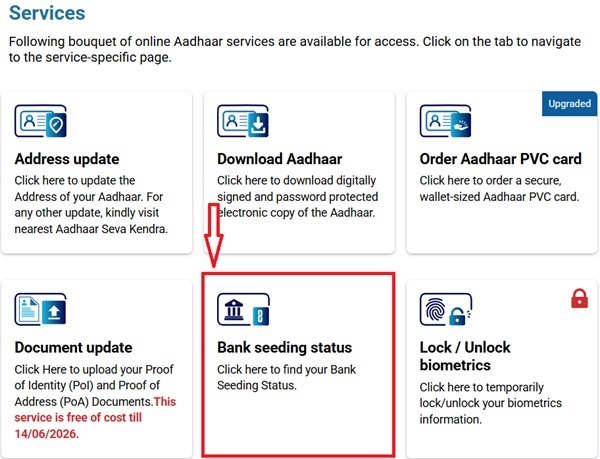
- Scroll down a little bit and click on Bank Seeding Status.
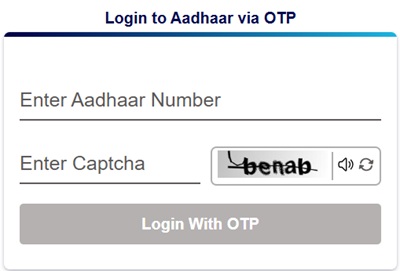
- You have to enter your Aadhaar Number and verify it through OTP.
- A list of services related to Aadhaar Card like Address Update, Download Aadhaar, Order Aadhaar PVC Card, will appear, from which you have to again select "Bank Seeding Status".
- As soon as you click on it, the portal will show the Aadhaar-Bank Mapping Status as shown below.
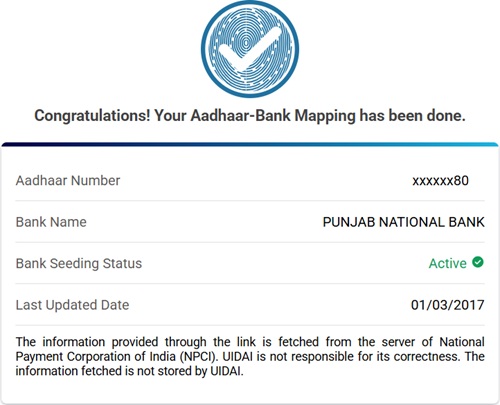
Note: UIDAI fetches this information from the NPCI server; the status shown is based on the NPCI mapper.
What the Status Means
- Active :- Aadhaar is successfully linked with a bank account in the NPCI mapper.
- Inactive / Not Linked :- Your Aadhaar has not yet been successfully seeded with any bank account or the bank has not updated the mapper.
Other Official Ways to Check Bank-Aadhaar Seeding Status
- If the online portal is not accessible or you prefer alternatives, you can also check your Aadhaar–bank seeding status via the following official methods :-
- Through the mAadhaar Mobile App.
- Through visiting your Bank Branch.
Aadhaar Bank Seeding Status Check through mAadhaar App
- You can also check your Aadhaar Card and Bank Seeding Status through the mAadhaar App.
- First, download the mAadhaar App from the Google Play Store or the Apple App Store.
- Open the mAadhaar mobile app, log in with the help of your Aadhaar Card Number which will be further verified through mobile OTP.
- After Logging In, scroll down a little and click on Aadhaar Linking/ Bank Status.
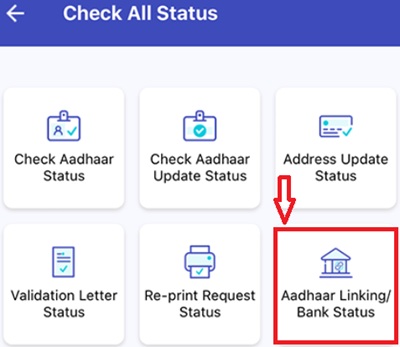
- Enter your Aadhaar Card Number and click on Check.
- The Aadhaar Card and Bank Linking Status will appear on your screen.
Aadhaar Bank Linking Status Check by Visiting the Bank Branch
- If you are unable to check your Aadhaar-bank linking status online, you can verify it by visiting your bank branch.
- This is a reliable and official method, especially for customers who do not use internet banking or mobile apps.
- Follow these steps at the branch to check your Bank Account and Aadhaar Card Linking Status :-
- Visit the bank branch where you hold your account.
- Ask for Aadhaar seeding or Aadhaar linking status inquiry.
- Provide your Aadhaar Card Number and Bank Account details if required.
- The bank executive will check the NPCI mapper status and inform you whether your Aadhaar is Active or Inactive.
- If the status is inactive, you can submit the Aadhaar consent form at the same branch to complete the linking process.
Why It's Important to Check
Checking Aadhaar-Bank seeding status ensures that government benefits like LPG subsidy, pension, and other DBT payments reach your account without delay. The official UIDAI portal and mAadhaar app provide secure ways to verify this status instantly.
If the status shows Inactive, contact your bank branch or use official banking channels to complete Aadhaar linking. Always rely on authentic platforms such as uidai.gov.in and never share Aadhaar OTP with unauthorized sources.
Keeping Aadhaar correctly linked with your bank account guarantees smooth, safe, and timely benefit transfers.
Comments
“Aadhaar bank mapping check NPCI”
“Aadhaar bank mapping check NPCl”
Add new comment