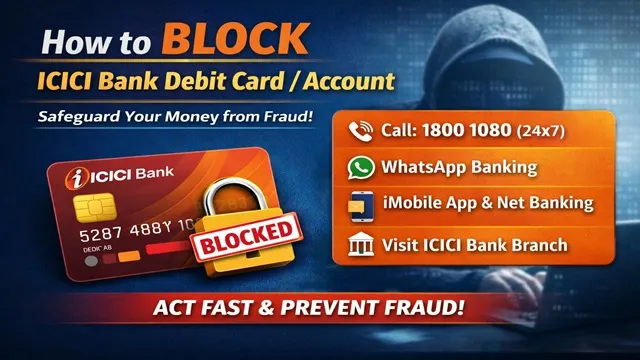
If your ICICI Bank Debit Card gets lost, or if any wrong transaction, misuse, or cyber fraud happens in your bank account or debit card, then you must immediately BLOCK / HOTLIST your ICICI Bank Debit Card or Account to prevent any further financial loss.
ICICI Bank provides multiple official and secure methods through which customers can instantly block their debit card, bank account, or report any suspicious transaction. Below, we explain each method step by step so you can choose the easiest and fastest option.
Method No. 1: Block Debit Card Through Call / IVRS
- ICICI Bank offers 24×7 customer care support for debit card and account blocking.
- You can call the official helpline number :-
- 18001080.
- After calling, follow the IVRS instructions as mentioned below :-
- Press 0 - To block your card, account, UPI ID or to report any unauthorised transaction.
- Thereafter, Press 1 - To block your debit card, account, or UPI ID.
- Thereafter Press 3 - To report any unauthorised or suspicious transaction.
- Once you confirm the required details, your debit card or account will be blocked immediately after the verification.
Method No. 2: Block Debit Card via WhatsApp Banking
- ICICI Bank also provides a WhatsApp Banking facility for quick debit card services.
- Open WhatsApp from your registered mobile number.
- Send "Hi" to 86400 86400.
- A multiple option will appear from which select "Banking Services" from the All Services section.
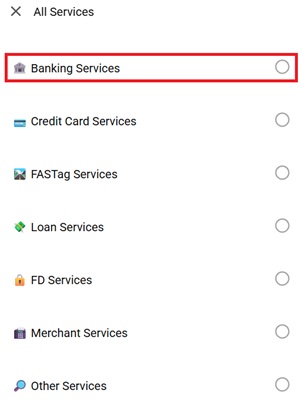
- You have to select the "Block/ Unblock DC" from Bthe anking Services option.
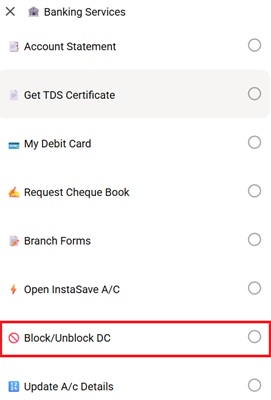
- Now, select Block Debit Card and verify your account via OTP.
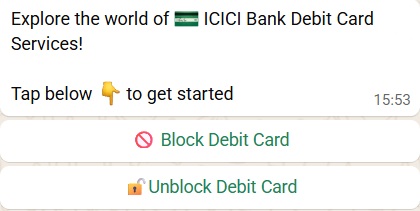
- Your ICICI Debit Card will be blocked instantly then.
Method No. 3: Block Debit Card Using ICICI Mobile App (iMobile)
- ICICI Bank has an official mobile app named "iMobile" through which you can also block your debit card.
- Download the iMobile App from Google Play Store or Apple App Store.
- Open the official iMobile App of ICICI Bank after downloading it.
- Log in with your User ID and Password or MPIN or register yourself if not registered already.
- Navigate to the Debit Card and click on Card Block
- Select the debit card you want to block.
- Verify the identification via mobile OTP.
- Your debit card will be hotlisted/ blocked immediately.
Method No. 4: Block Debit Card Through Internet Banking
- You can also block your debit card through the Internet Banking Services of ICICI Bank.
- Login to your ICICI Internet Banking account.
- Go to the Card and Loans section and select "Debit/ ATM Card".
- From Service Request, select Block Card.
- Fill in the Account Number, Debit Card Number, Action, Type of Blocking and Reason for Blocking.
- Portal will verify your identity of yours via Mobile OTP, Email OTP or through Call.
- After confirmation, your debit card will be blocked instantly.
Method No. 5: Visit Nearest ICICI Bank Branch
- If any of the above mentioned method didn't work to block the ATM Card, you can also visit your nearest ICICI Bank branch.
- Inform the bank official about debit card loss or fraud.
- Submit a Debit Card / Account Blocking Request.
- After verification, the bank will immediately block your card or account.
Important Safety Tips
- Never share your OTP, CVV, PIN, or card details with anyone.
- Always use only official ICICI Bank channels for card blocking.
- Report any unknown transaction immediately through IVRS or WhatsApp.
- Regularly check your bank statements and alerts.
Blocking your debit card or account on time can save you from major financial loss. ICICI Bank has provided many fast and secure options so that customers can take immediate action in case of an emergency.
Now you know all the official ways to block or hotlist your ICICI Bank Debit Card and Account.
Comments