
A Bonafide Himachali Certificate is an official document issued by the Government of Himachal Pradesh certifying that a person is a permanent resident of the state. It is issued in Form-G by the Tehsildar or Sub-Divisional Magistrate (SDM) of the applicant's area under the Revenue Department. The certificate is required for state government jobs, education quota admissions (including HPCET), and Himachal Pradesh-specific welfare schemes. Apply at himseva.hp.gov.in - the HimSeva Portal of Himachal Pradesh. The old edistrict.hp.gov.in URL now automatically redirects to himseva.hp.gov.in. Registration requires Aadhaar Number, Him Parivar ID, Him Member ID, or Ration Card with OTP verification. Documents from DigiLocker can be directly fetched during the application. Fee is Rs. 55. Processing time is 10 to 15 working days. Validity is lifetime.
- HimSeva Portal (Apply/Track/Download): himseva.hp.gov.in
- Bonafide Himachali Certificate Info Page: himseva.hp.gov.in/Bonafide-Certificate
- Him Access SSO Portal: sso.hp.gov.in
- Toll Free: 1800-180-8076
- Helpdesk Email: [email protected]
- Officer Helpline: 0177-3525101 / 0177-2525102
Eligibility Criteria
The applicant must fall under any one of the following categories to be eligible for a Bonafide Himachali Certificate:
- Born in Himachal Pradesh
- Permanent resident of Himachal Pradesh for at least 15 years
- Parents or grandparents are permanent residents of Himachal Pradesh
- Owns a permanent home in Himachal Pradesh but currently living outside the state for employment or occupation
- Owns residential property in Himachal Pradesh
- Married to a permanent resident of Himachal Pradesh (for women)
Note: Bonafide Himachali Certificate can be obtained from only one state or UT. Obtaining it from more than one state or UT is an offence.
Issued in Form-G - What This Means
The Bonafide Himachali Certificate is issued in a prescribed government format called Form-G. This is the standardized HP Revenue Department certificate format for permanent residence proof. The Tehsildar or SDO (Civil)/SDM of the applicant's area is the competent authority to issue this certificate. Field verification is done by the Circle Officer, Village Administrative Officer (VAO), and Revenue Inspector (RI) who check the Parivar Register of the applicant's village to verify the family's listed residence in HP.
What is Him Parivar ID
Him Parivar ID is Himachal Pradesh's family identifier - a unique ID assigned to each family under the HP Family ID scheme. It is required for registration on HimSeva portal alongside Aadhaar. If you do not have a Him Parivar ID, you can also register using the Ration Card or Him Member ID during sign-up on himseva.hp.gov.in. The Him Parivar ID links family members to the HP government services database.
Documents Required
- Proof of Residence (any one): Ration Card, Electricity Bill, Water Bill, Land/Property Record, or Voter ID
- Self-Declaration / Affidavit
- Aadhaar Card (mandatory for portal registration and e-KYC)
- Letter or Certificate from Pradhan or Local Body Head certifying residence
- Birth Certificate or School Leaving Certificate (showing date and place of birth in HP)
- Passport-size photograph
- Parent's Bonafide Himachali Certificate (if applying on basis of parents' residence)
Documents from DigiLocker can be directly fetched into the application form on HimSeva portal - no manual upload needed for DigiLocker-linked documents like Aadhaar and education certificates.
Application Fee Breakdown
| Fee Component | Amount |
|---|---|
| Government Fee | Rs. 20 |
| Processing Charges | Rs. 10 |
| LMK / CSC Charges | Rs. 25 |
| Total | Rs. 55 |
| Processing Time | 10 to 15 working days |
How to Apply Online at HimSeva Portal
Portal: himseva.hp.gov.in (formerly edistrict.hp.gov.in - same portal, renamed)
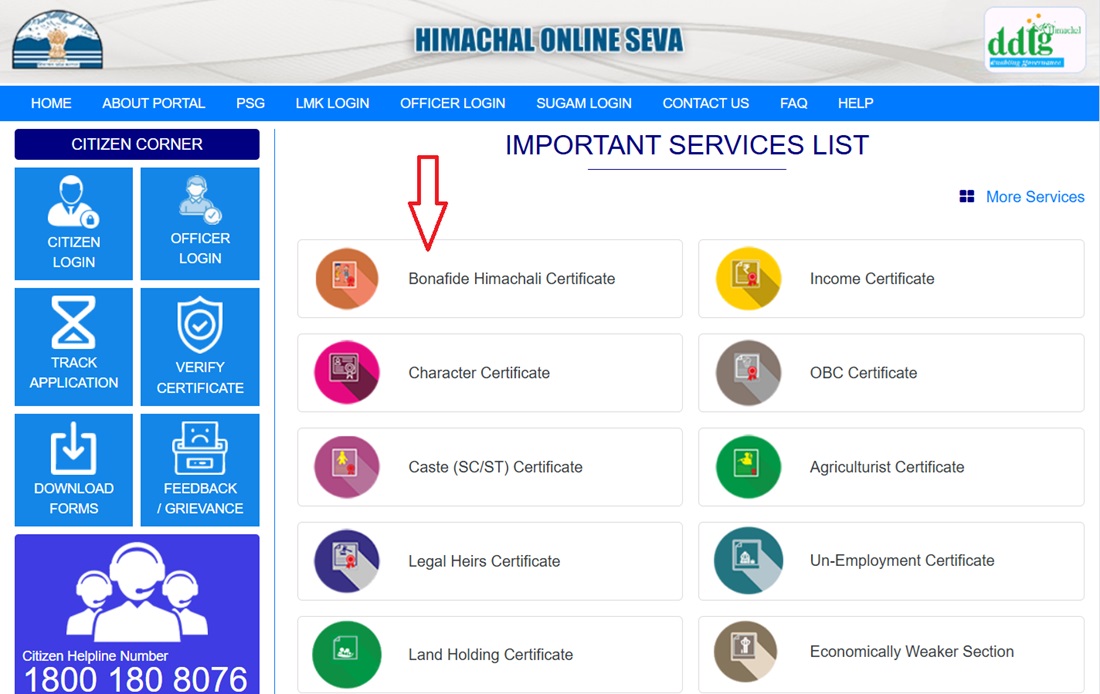
- Visit himseva.hp.gov.in and click on Bonafide Himachali Certificate.
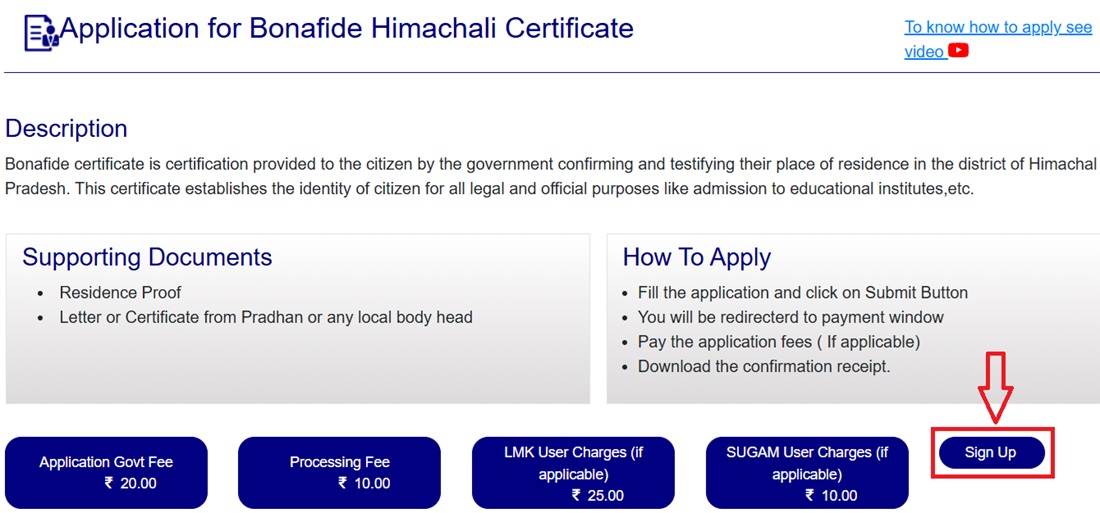
- Read the instructions on screen about the application. Click Sign Up.
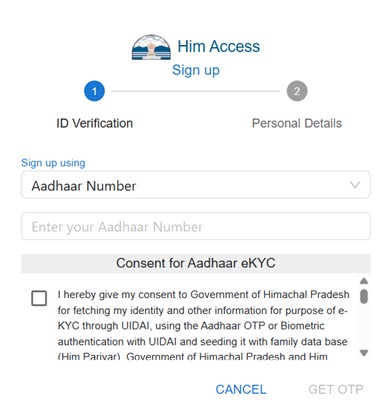
- Enter your Aadhaar Number, Him Parivar ID, Him Member ID, or Ration Card and verify through OTP.
- Fill in personal details after verification. A Him Access ID is issued.
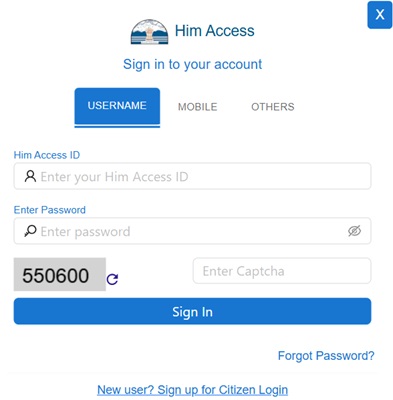
- Log in with your Him Access ID and password.
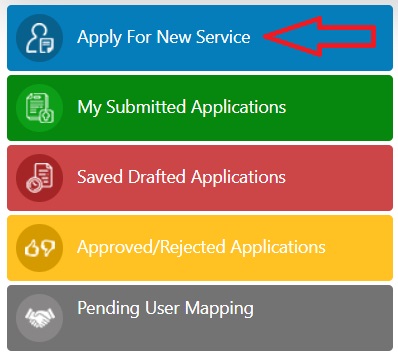
- Click Apply for New Service.
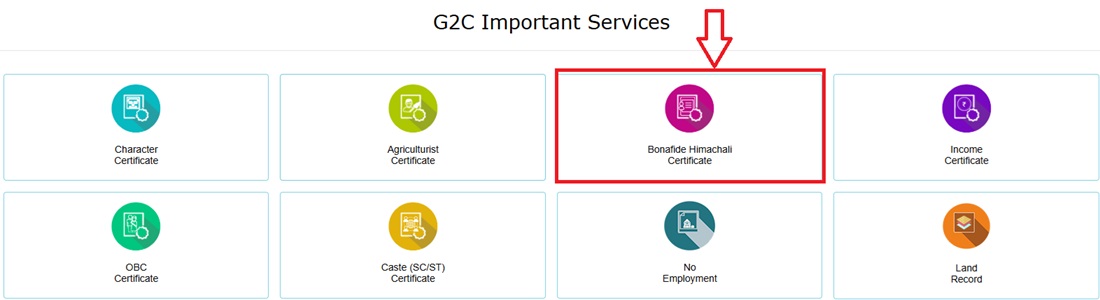
- Select Bonafide Himachali Certificate from the G2C Important Services section.
- A domicile dashboard appears. Click New Application.

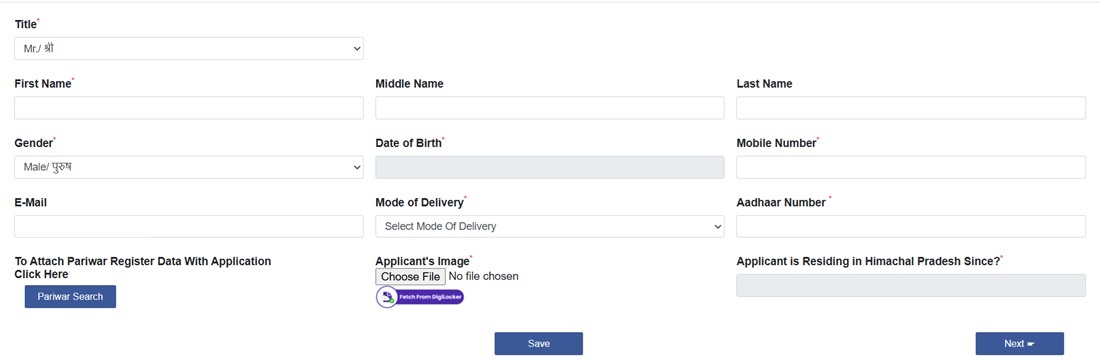
- Fill the detailed application form with the following sections:
- Basis of Bonafide Himachali - select the eligibility basis (birth/15 years/parents etc.)

- Applicant's Personal Details
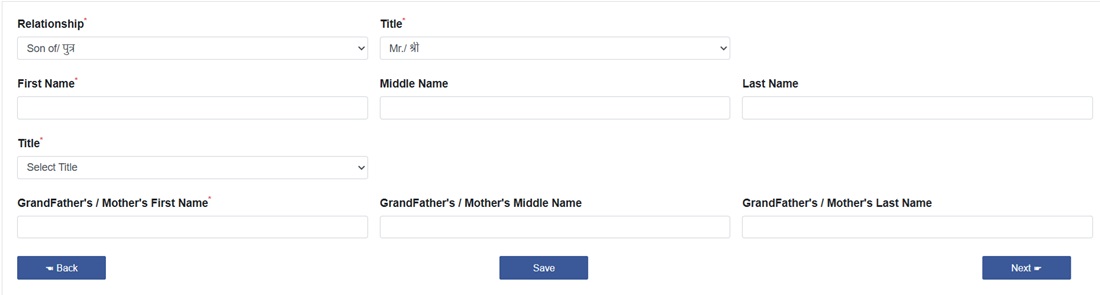
- Father's / Mother's / Husband's Details
- Permanent Address Details
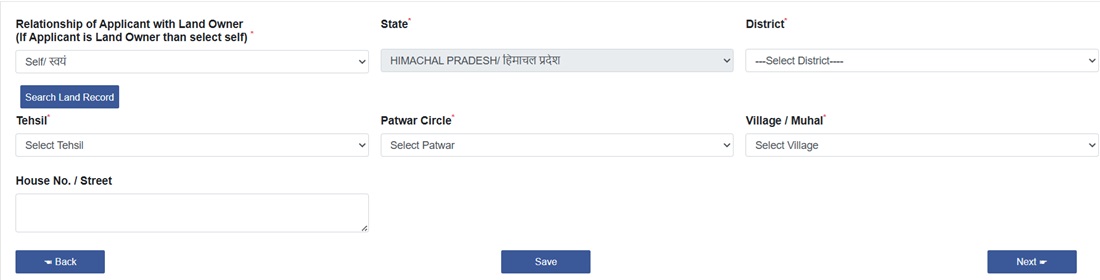
- Upload Documents - documents can also be fetched directly from DigiLocker

- Basis of Bonafide Himachali - select the eligibility basis (birth/15 years/parents etc.)
- Pay Rs. 55 fee online and click Submit.
- Note the Application Reference Number (ARN). Download the acknowledgement receipt.
How to Apply via Him Access SSO Portal
- Visit sso.hp.gov.in - the Him Access Single Sign-On Portal.
- Registration process is identical to HimSeva portal - use Aadhaar, Him Parivar ID, or Ration Card.
- After login, from All Services select HP eDistrict.
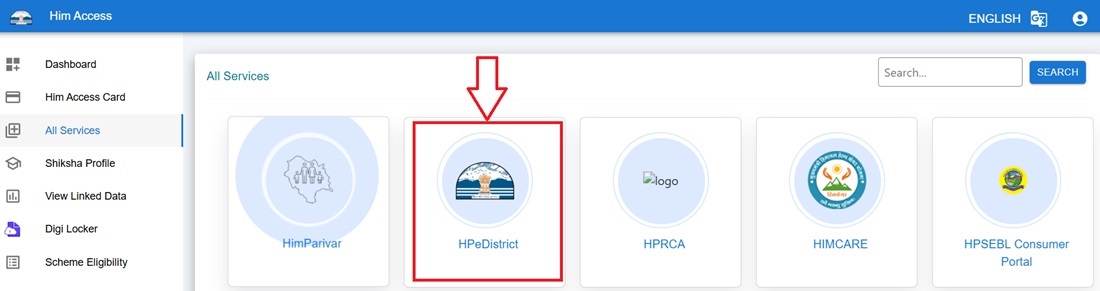
- The Him Access SSO Portal redirects to HimSeva portal. Follow the same application steps from there.
Field Verification Process
After submission, the application goes through field verification before the Tehsildar or SDM issues the certificate:
- The Circle Officer and Village Administrative Officer (VAO) verify the application.
- The Revenue Inspector (RI) checks the Parivar Register of the applicant's village to confirm the family's listed residence in HP.
- If any discrepancy or query arises during verification, additional documents may be requested. Respond promptly to avoid delays.
- After positive verification, the Tehsildar or SDO (Civil)/SDM issues the Bonafide Himachali Certificate in Form-G.
How to Check Application Status Online
- Log in to himseva.hp.gov.in and from Citizen Corner select Track Application.
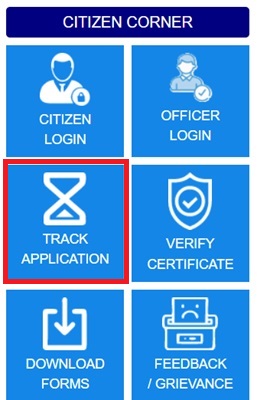
- Select Application for Bonafide Himachali Certificate and enter your Application Number (ARN).

- Application status appears if the ARN is correct.
How to Check Status via SMS
Send SMS: HP EDIST <Application Number> to any of these numbers:
- 166
- 51969
- 9223166166
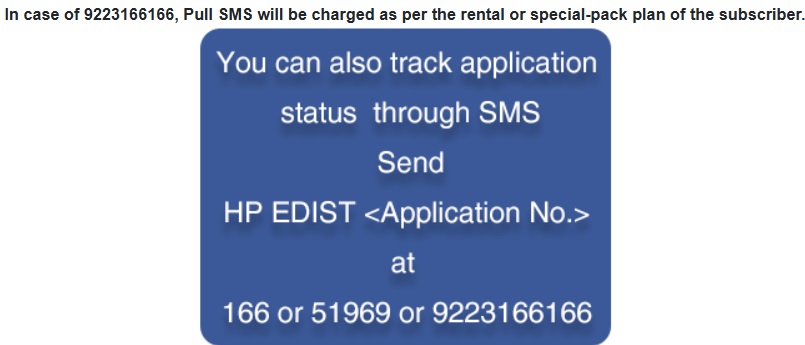
Standard SMS charges apply.
How to Download Certificate
- Log in to himseva.hp.gov.in after receiving approval notification.
- Select Approved / Rejected Application.
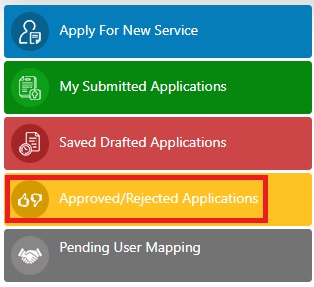
- Click the approved application and select Download Certificate.
- The digitally signed Bonafide Himachali Certificate downloads in PDF. No physical collection from any office needed.
How to File a Grievance
- Log in to himseva.hp.gov.in and from Citizen Corner select Feedback / Grievance.
- Fill the grievance form describing your issue thoroughly.
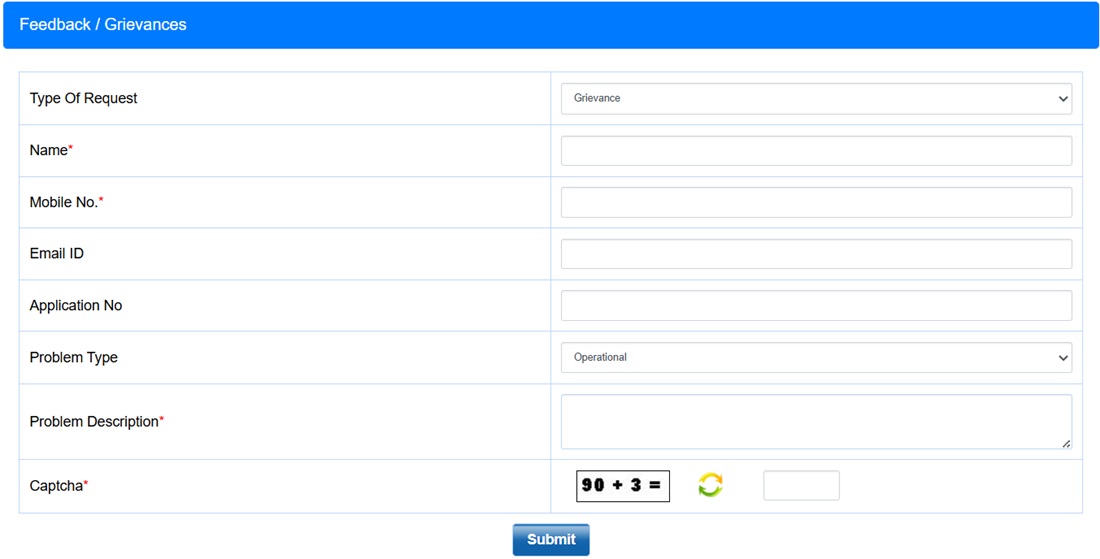
- Submit. The grievance reaches the concerned officers for priority resolution.
Important Links
- HimSeva Portal - himseva.hp.gov.in
- Bonafide Certificate Info - himseva.hp.gov.in
- Him Access SSO Portal - sso.hp.gov.in
Helpline
- Toll Free: 1800-180-8076
- Email: [email protected]
- Officer Helpline: 0177-3525101 / 0177-2525102
Comments
Side effect of Bonafide Himachal
Village Dasmal
Po ladraur
Tehsil. Bhoranj
District Hamipur
Add new comment